Skip to content
No results
  • Home
  • Forex
  • About Us
  • Privacy Policy

Physical Address

304 North Cardinal St.
Dorchester Center, MA 02124

SGFinance
  • Home
  • Forex
  • About Us
  • Privacy Policy
SGFinanceSGFinance

How to Create MQL5 Account: Step-by-Step Guide

A complete step-by-step guide on how to create an MQL5 community account. Learn how to register at MQL5.com, receive your login credentials via email, and activate your account to access the Market, Signals, VPS, and more.

  • Edi WijanarkoEdi Wijanarko
  • August 10, 2026
  • MQL5 Tutorials
  • 1 Comment

If you are looking for a complete MQL5 account registration guide on how to create MQL5 account, you are in the right place. This MQL5 sign up tutorial will walk you through how to register MQL5 community account step by step using the Manual registration method. MQL5.com is the official community platform by MetaQuotes, the developer behind MetaTrader 4 (MT4) and MetaTrader 5 (MT5). By creating an account, you will gain access to powerful features such as the Market, Signals, Virtual Hosting (VPS), and a global trading community Forum.

What is MQL5.com and Why Create an MQL5 Account?

MQL5.com is the official community website developed and maintained by MetaQuotes. It serves as the central hub for MetaTrader users worldwide. Whether you are a beginner trader or an experienced developer, having an MQL5 account opens the door to a wide range of tools and services.

Here are the main features you can access after you create MQL5 community account:

  • Market — Browse, download, and purchase free or paid indicators and Expert Advisors (EA) developed by professional programmers worldwide.
  • Signals — Subscribe to professional traders and automatically copy their trades directly into your MetaTrader platform.
  • Virtual Hosting (VPS) — Rent a dedicated VPS from MetaQuotes to keep your Expert Advisors running 24 hours a day, 7 days a week, without leaving your personal computer on.
  • Forum & Community — Connect, ask questions, and share knowledge with traders and developers from all around the world.

In short, your MQL5 account is your passport to the entire MetaTrader ecosystem.

What You Need to Create MQL5 Community Account

Before you start the registration process, make sure you have the following ready. This MQL5 account registration guide recommends preparing these items in advance so you can register MQL5 community account step by step without interruptions:

  1. A valid and accessible email address — Use an email account you actively check, such as Gmail, Yahoo, or Outlook. MQL5 will send your login credentials to this email.
  2. A preferred username — Choose a username using Latin letters (A-Z, a-z) and numbers (0-9) only. No spaces and no special characters are allowed.
  3. A web browser with an internet connection — Any modern browser such as Google Chrome, Mozilla Firefox, or Microsoft Edge will work perfectly.

Once you have these ready, you can proceed to the next step.

How to Create MQL5 Account (Step-by-Step)

Follow these five simple steps to successfully register your MQL5 account. This MQL5 sign up tutorial is based on the Manual registration method, which is straightforward and quick to complete. We will show you how to register MQL5 community account step by step with detailed screenshots.

Step 1 — Go to MQL5.com

First, open your preferred web browser. Next, type www.mql5.com in the address bar and press Enter. You will land on the MQL5.com homepage, which is the starting point of your registration journey. To register MQL5 community account step by step, this is where everything begins.
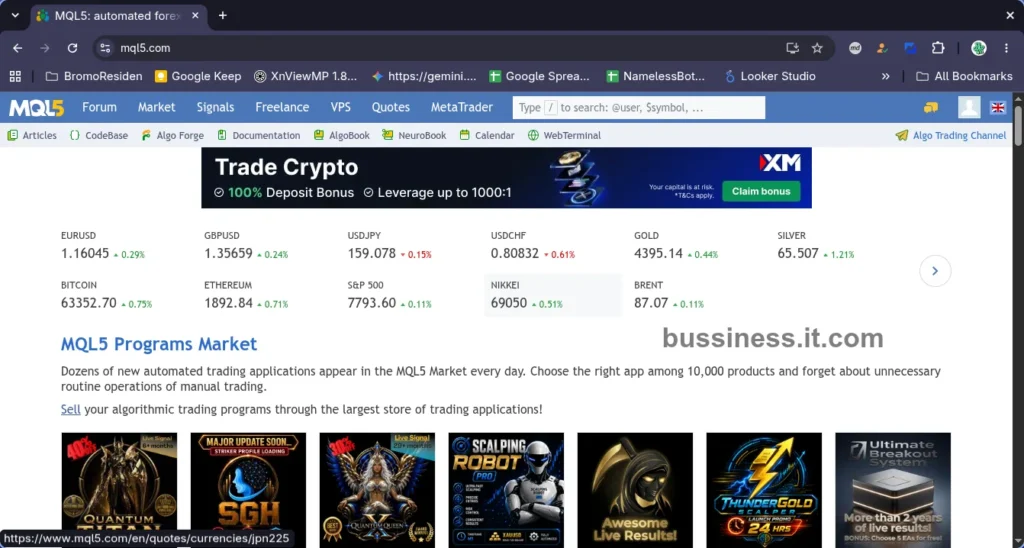
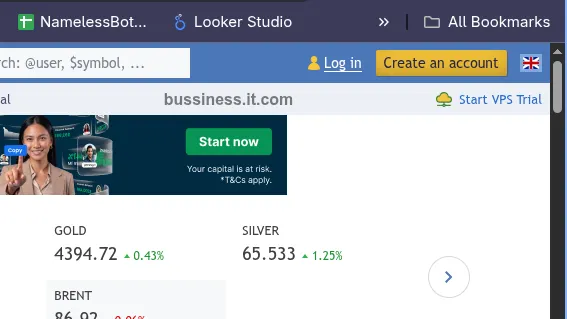
How to create account starting from the MQL5.com homepage
The official MQL5.com homepage — the starting point of your registration journey.

Step 2 — Click “Create an Account”

Create an account button at the top right corner of MQL5.com to register MQL5 account
The “Create an account” button located at the top right corner of the MQL5.com header.

Once you are on the homepage, look at the top right corner of the page. There, you will find the “Create an account” button. Click that button to begin the registration process. After clicking it, you will be automatically redirected to the official registration page at:

https://www.mql5.com/en/auth_register

This is the page where you will fill in your registration details.

Step 3 — Fill in the MQL5 Account Registration Form

On the registration page, you will see the following elements:
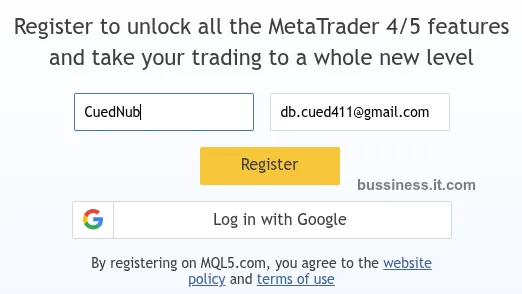
MQL5 account registration guide showing the manual registration form with login and email fields
The MQL5 manual registration form at mql5.com/en/auth_register — fill in your username and email address.

1. Login (Input Box)
This is where you enter your desired username. Your username will be your public identity across the entire MQL5 community, so choose it carefully.

Rules for creating a username:

  • Use Latin letters only (A-Z, a-z)
  • Numbers (0-9) are allowed
  • No spaces allowed
  • No special characters such as @, #, !, or %

Examples of valid usernames:

  • CuedNub
  • BudiForex99
  • RizkyEA

2. Your Email (Input Box)
Enter your active email address in this field. This is very important because MQL5 will send your login password to this email. Make sure there are no typos.

Example: db.cued411@gmail.com

3. Register (Button)
After filling in both fields, click the “Register” button to submit your registration form.

4. Log in with Google (Button)
This is an alternative quick registration option. However, this method is not covered in this guide. We will focus on the Manual method instead.

Warning: Important: Before clicking Register, double-check your username and email address to make sure everything is correct.

Step 4 — Check Your Email for Login Credentials

After clicking the Register button, a confirmation message will immediately appear on your screen:

“The password has been sent to [your email address]”
“Log in using the obtained password and the login specified during the registration”

This means your registration was successful. Next, follow these steps:

  1. Open your email inbox.
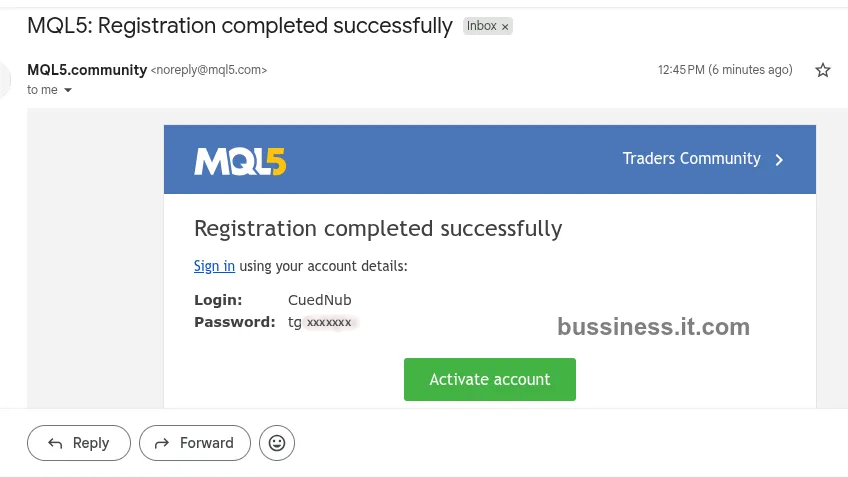
  2. Look for an email from MQL5.community sent from noreply@mql5.com.
  3. Open that email. Inside, you will find two important pieces of information:
  • Login: Your registered username (e.g., CuedNub).
  • Password: A system-generated password created automatically by MQL5.
Email from MQL5.community containing login username and password to create MQL5 account
Registration confirmation email from MQL5.community containing your Login username and auto-generated Password.

Tip: If you cannot find the email in your inbox, check your Spam or Junk folder.

Step 5 — Activate Your Account

After obtaining your login credentials from the email, go back to the MQL5 browser tab. You will see an activation form with the following fields:

1. Your Login (Input Box)
This field will already be auto-filled with your registered username. You do not need to type anything here.

2. Password (Input Box)
Enter the password that you received from the MQL5 email exactly as written.

Finally, click the “Activate account” button. After clicking it, your account will be immediately activated.
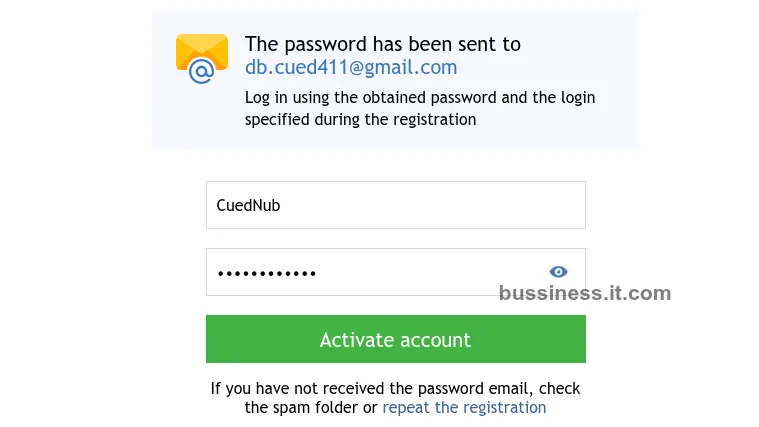
Activate account form with auto-filled login username and password input
Enter the password from your email and click “Activate account”.

Congratulations! Your MQL5 account has been successfully created and activated!

What to Do After You Register MQL5 Account

Now that your account is active, here are the recommended next steps to get the most out of your MQL5 experience. As this MQL5 sign up tutorial has shown, creating your account is just the beginning:

  1. Change Your Password
    The password you received via email is system-generated and difficult to remember. Therefore, it is strongly recommended to change it immediately. Go to Settings > Security and set a new password that is strong yet easy for you to remember.
  2. Complete Your Profile
    Add a profile picture, write a short bio, and fill in your personal information. A complete profile builds credibility, especially if you plan to interact with the MQL5 community.
  3. Explore the Market
    Visit the MQL5 Market to browse thousands of free and paid indicators and Expert Advisors. You can filter by rating, price, and MetaTrader version.
  4. Subscribe to Signals
    If you want to automatically copy trades from professional traders, head over to the Signals section and choose a signal provider that suits your trading style.
  5. Identity Verification (If Needed)
    If you plan to become a Seller or a Signal Provider on MQL5, you will need to verify your identity. This involves uploading a government-issued ID such as a passport or national ID card in the profile settings.

FAQ About How to Register MQL5 Account

Here are some frequently asked questions about the MQL5 account registration process. If you follow this MQL5 account registration guide carefully, most common issues can be avoided:

Is It Free to Create MQL5 Account?

Yes, creating an MQL5 account is completely free. There are no registration fees whatsoever. However, some products and services on MQL5.com, such as premium indicators or VPS hosting, may require payment.

I Didn’t Receive the Email from MQL5. What Should I Do?

If you did not receive the email from MQL5.community, try the following solutions:

  • Check your Spam or Junk folder — The email might have been automatically filtered.
  • Verify your email address — Make sure you entered the correct email during registration.
  • Try registering again — Go back to the registration page and submit a new registration using the correct email address.

Can I Change My Username After I Create MQL5 Account?

Unfortunately, MQL5 does not allow users to change their username after registration. Therefore, it is very important to choose your username carefully before clicking the Register button.

Can I Use My MQL5 Account on Both MT4 and MT5?

Yes, absolutely. Your MQL5 community account is universal and works seamlessly with both MetaTrader 4 (MT4) and MetaTrader 5 (MT5) platforms. You only need one account to access all MQL5 services across both platforms.

Conclusion

In summary, learning how to create MQL5 account is a simple and straightforward process that only takes a few minutes. This MQL5 sign up tutorial has shown you the complete MQL5 account registration guide from start to finish. To recap, here are the five steps you need to follow:

  1. Go to www.mql5.com
  2. Click “Create an account”
  3. Fill in the MQL5 account registration form with your username and email
  4. Check your email for login credentials from MQL5.community
  5. Enter your password and click “Activate account”

Now that your account is active, a world of trading tools, signals, and community resources is at your fingertips. Whether you want to download Expert Advisors, follow professional traders, or join the global trading discussion, MQL5 has everything you need.

Create your MQL5 account now and start exploring the full potential of MetaTrader today!

Related Articles

Want to learn more about trading? Check out these guides:

  • Forex Trading for Beginners: The Ultimate Guide
  • How Forex Market Works: Structure and Participants
Tags
# MetaTrader# metatrader 5# MQL5# mql5 account# MQL5 Community# MQL5 Registration# Trading Account
Edi Wijanarko
Edi Wijanarko
Articles: 11
A conceptual illustration explaining how forex market works by connecting massive banking institutions with everyday individuals who trades forex from home.
Previous Post How Forex Market Works: Structure and Participants
Next Post Change MQL5 Password: A Complete Step-by-Step Guide
MQL5 account security settings page showing the form fields to change MQL5 password.

Live Search

No results
Buy Divergence Core Pro MT5 Expert Advisor in the store selling algo trading systems
MetaTrader World Markets

Posts

A digital illustration of a simulated broker account screen helping users understand what is forex trading and practical chart analysis in forex trading for beginners (generate image by ai)

What is Forex Trading: A Complete Beginner’s Guide

June 9, 2026

Forex Trading for Beginners: The Ultimate Guide

June 12, 2026

How to Create MQL5 Account: Step-by-Step Guide

August 10, 2026
A conceptual illustration explaining how forex market works by connecting massive banking institutions with everyday individuals who trades forex from home.

How Forex Market Works: Structure and Participants

June 27, 2026
Step-by-step tutorial banner showing how to change MQL5 profile picture and update account avatar.

Change MQL5 Profile Picture: A Simple Step-by-Step Tutorial

August 26, 2026

Categories

  • Forex
  • MQL5 Tutorials

Trending now

How to Create MQL5 Account: Step-by-Step Guide
MQL5 account security settings page showing the form fields to change MQL5 password.
Change MQL5 Password: A Complete Step-by-Step Guide
Step-by-step tutorial banner showing how to change MQL5 profile picture and update account avatar.
Change MQL5 Profile Picture: A Simple Step-by-Step Tutorial

Copyright © 2026 - CreativeThemes

Terms & Services | Privacy Policy